


Getting Started
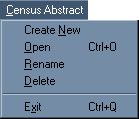
To begin transcribing a census, you must create a new abstract. Click on the Census Abstract menu and choose Create New menu item.
A dialog box will be displayed. Enter the state abbreviation and county name.
Select the census year you wish to transcribe from a list by clicking on the
arrow to the right of the Year box. Once the state, county and year have been entered, click the OK button.
 Click here to go to next screen.